
JavaScript Editor and IDE Features
EditRocket, a Text and Source Code Editor with support for over 20 programming languages, includes a powerful JavaScript editor and IDE that strives to make JavaScript development quick and easy.
The JavaScript editor included in EditRocket includes many tools and features to aid in JavaScript development. See below for information on the JavaScript specific tools offered by EditRocket.
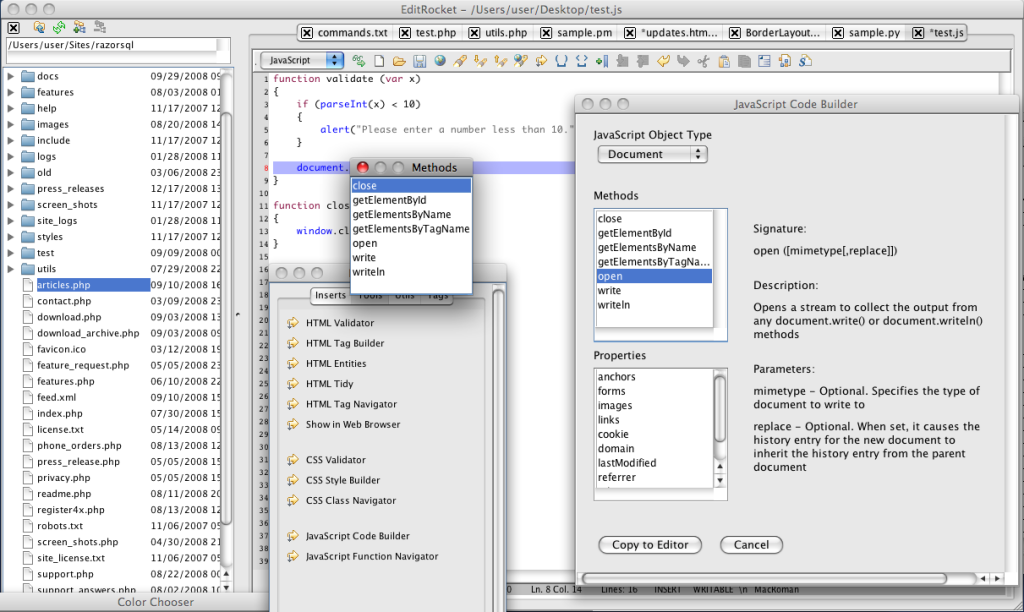
JavaScript Auto Completion
Code more quickly with the JavaScript Auto Complete Tool. The auto complete tool automatically brings up a list of applicable methods when typing a (.) after a variable name. Auto-complete is available for the built-in JavaScript objects, such as Array, String, Math, etc. and the DOM objects, such as document, location, window, etc. For more information, see the following: JavaScript Auto Completion
JavaScript Source Code Builder
With EditRocket, there is no need to memorize JavaScript APIs. The JavaScript Code Builder includes information on the functions contained in the JavaScript library, for example, Math, String, Document, and many more.
The Code Builder works by allowing users to select a function category, such as String, and then it displays function signature and function description information for all functions in the selected category. The user can copy the function name to the editor, and the signature will display as a tooltip. For more information, see the following: JavaScript Code Builder
JavaScript Validator
The JavaScript validator included with EditRocket uses the javascript lint validation tool. The validator checks for syntax errors and questionable coding practices. For more information, see the following: JavaScript Validator
JavaScript Compressor
EditRocket includes a JavaScript compressor that compresses scripts resulting in faster downloads. For more information, see the following: JavaScript Compressor
JavaScript Sidekick
Code more effeiciently with the JavaScript Sidekick. The sidekick gives users the ability to quickly enter many common JavaScript constructs into the text editor with the click of a button, or via customizable keyboard shortcuts. Some examples of code assistant options are for loop syntax, function syntax, and if, if else, and else syntax. The sidekick also includes a tab for the JavaScript Function Navigator. For more information, see the following: JavaScript Sidekick
JavaScript Function Navigator
Jump from function to function easily with the JavaScript Function Navigator. The navigator parses the editor contents for JavaScript functions and displays them in a clickable list. Clicking an option from the list takes the user directly to the point in the editor where the function is defined.
General Highlights

|
Text Editor |

|
Coding Tools | |
| Macros, coding inserts, plugins, syntax highlighting, and more. | Sidekicks, code builders, function navigators, program execution, and more. | |||

|
Web Development Tools |

|
Validators | |
| CSS style builder, HTML tag builder, tag navigators, and much more. | XML, HTML, and CSS validators | |||

|
Search Tools |

|
Auto Completion and Lookup | |
| Regular expression capable find and replace, find / replace in files across the entire file system and more. | Auto code completion, tag completion, and lookup for many programming languages. | |||

|
File System Browser |

|
File Compare | |
| Browse files and directories, perform file operations, and more. | Compares files similar to the Unix diff command. | |||

|
FTP and SFTP Client | |||
| Connect to SFTP and FTP servers. Browse, upload, download, rename, and delete files and directories and much more. |
Additional Features
- Syntax highlighting for over 20 programming languages
- The programming editor behind RazorSQL, a popular database query tool, since 2004
- File tools such as head, tail, regular expression search, move, copy, and delete
- Customizable and pre-defined code templates
- Spell Checker
- Works with all major operating systems including Windows, Mac OS X, macOS, Linux, and Solaris.
